Memory
Physical memory measured with footprint while idle in the menu bar. Results vary by machine.
 Initials
Download
Initials
Download
MAC APP SWITCHING · NATIVE · OPEN SOURCE
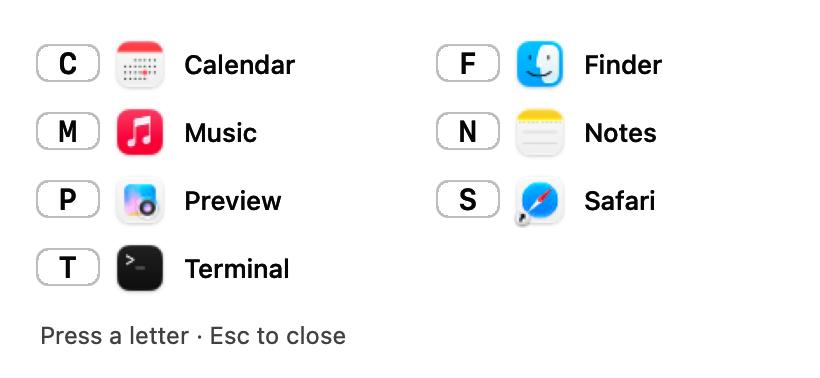
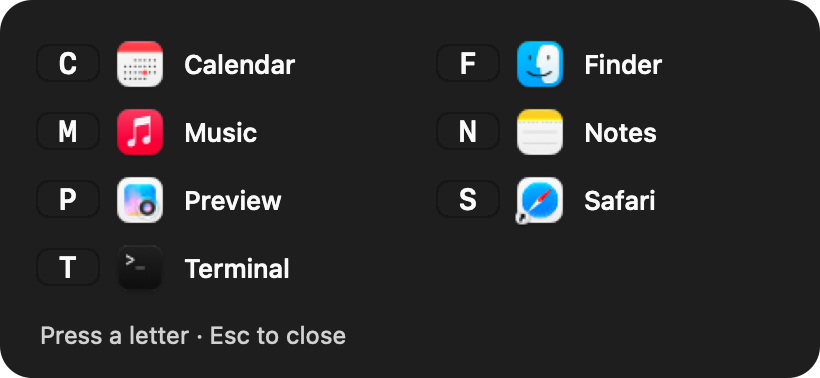
Give your favorite apps a letter. Right ⌘+M switches to Music; press again to hide it. Skip the Dock and the walk through ⌘Tab. You can also configure left ⌘, or double-tap Command to see a panel of your letters.
v1.1.0 · 1.8 MB · macOS 14 or later · Apple Silicon
Developer ID signed and notarized by Apple
Physical memory measured with footprint while idle in the menu bar. Results vary by machine.
Event-driven, with no key polling. Measured CPU time: 0.04 seconds per idle minute.
A local benchmark of the key decision only, not total app-switch latency. App activation runs outside the callback.
Built with Swift and AppKit, without an embedded browser or bundled web runtime.
TWO WAYS · EITHER COMMAND KEY
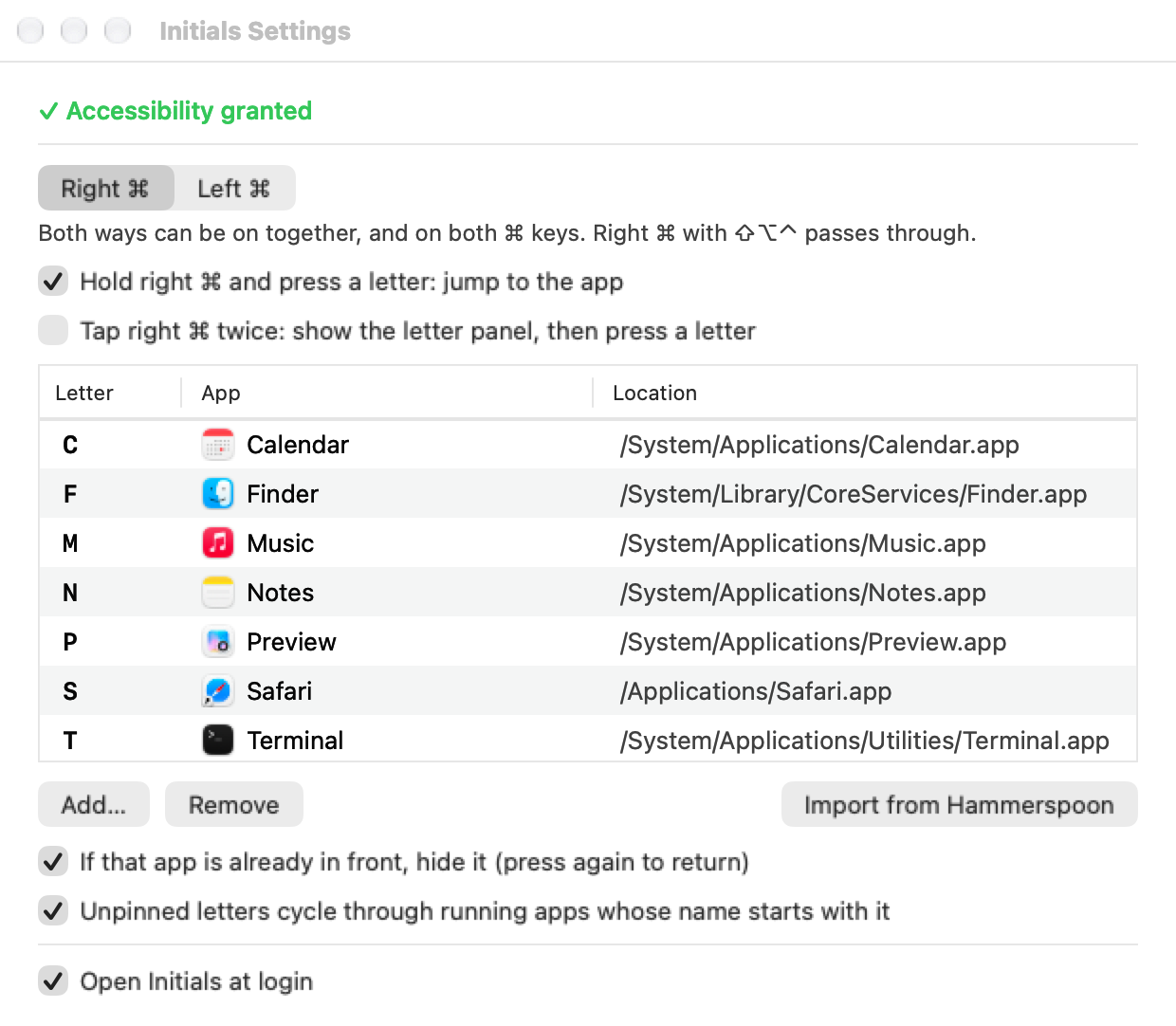
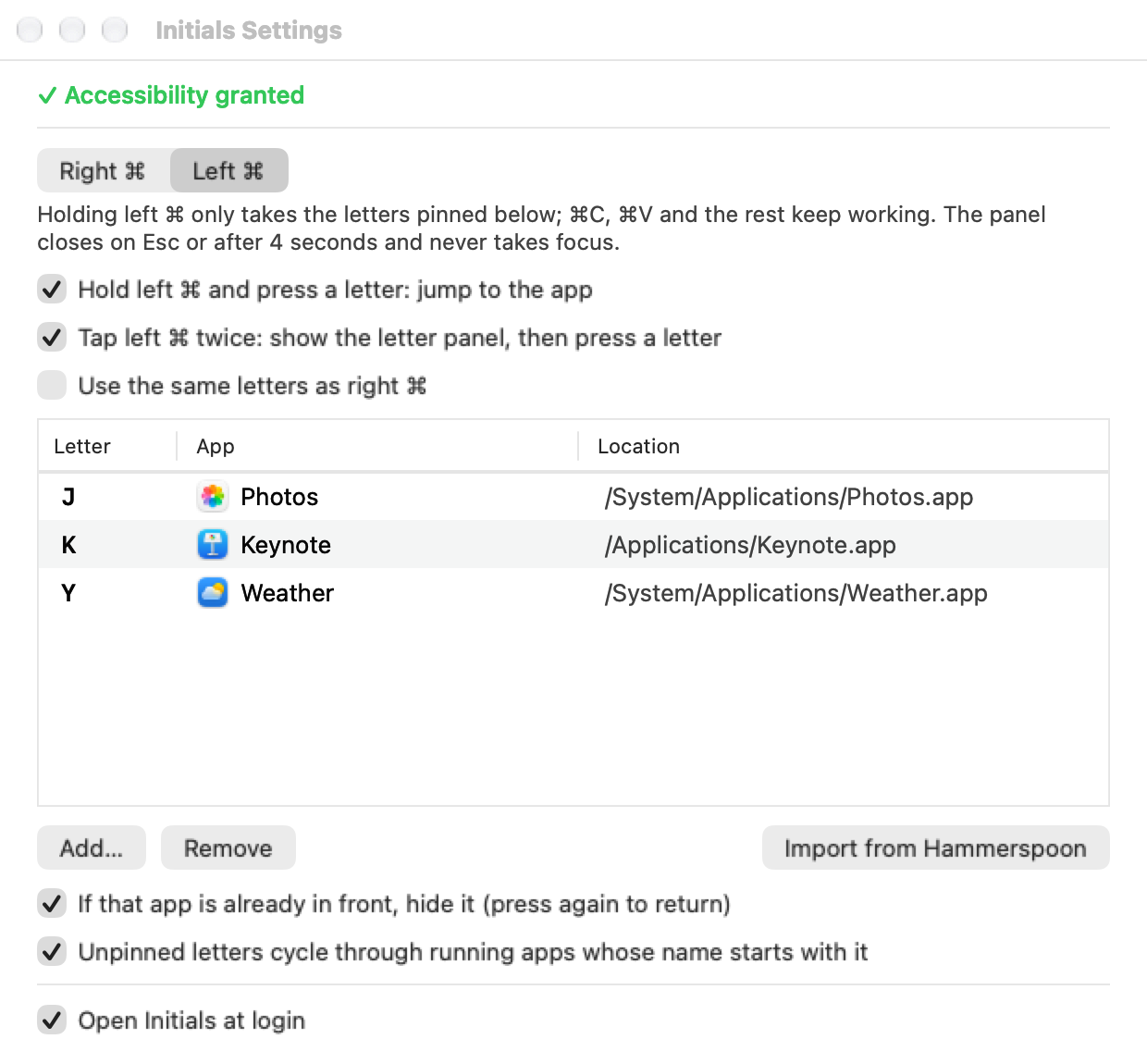
Set each Command key independently: hold plus a letter, double-tap for the panel, or both. The defaults are hold on right ⌘ and double-tap on left ⌘. Left-hand hold is optional.
Right ⌘ or Left ⌘ held + letter
⌘ ⌘ → letter
Settings
Click the menu bar ⌘ icon → Settings. Keyboard controls: ⌘1/⌘2 switches between right and left ⌘, ⌘N adds a binding, ⌫ removes one, ↩ changes its app, and ⌘W closes Settings.
RELATED TOOLS
Checked against the linked official project descriptions on September 24, 2026. Performance figures above apply only to Initials; they are not cross-product benchmarks.
| Initials | rcmd | OctoCmd | rcmd-lite | Thor | |
|---|---|---|---|---|---|
| Switching | Either ⌘: hold + letter, double-tap for a panel, or both | Right ⌘ + letter | Right ⌘ for the panel, then a letter | Right ⌥ + letter | Set a shortcut for each app |
| Unpinned letters | Cycle running apps with that initial | Match by initial | Match by initial | Temporarily assigned to running apps | — |
| Other features | CLI; Hammerspoon import | See its website | Screen text search, keyboard clicking and scrolling modes | Hint panel | — |
| Source | Open source · MIT | See its website | Open source · Apache-2.0 | Public source | Open source · MIT |
Initials is for people who want a small app switcher. If you also want screen text search or keyboard-driven clicking, see OctoCmd.
Install
Requires macOS 14 or later on an Apple Silicon Mac (M-series).
Open the downloaded DMG, drag Initials to Applications, then open it from Applications. The download is Developer ID signed and notarized by Apple.
Settings opens on first launch. Click Open Accessibility Settings…, then enable Initials under System Settings › Privacy & Security › Accessibility. Back in Settings, look for ✓ Accessibility granted — active . No restart is needed.
Why this is needed: Initials uses a system event tap to recognize its Command shortcuts and prevent handled keys from reaching the current app. It does not record or save typed text.
Click Add… to choose an app and a letter. If you use Hammerspoon rcmd, select Import from Hammerspoon. Once you have checked that Initials works, use Turn off Hammerspoon rcmd so only one tool handles the shortcut.
THREE SHORT CLIPS · ENGLISH CAPTIONS
See the right-hand table, the letter panel and separate left-hand settings. Pause, seek, go full screen or download each clip. No audio is required.
Real native UI rendered offscreen with example settings. This is not a continuous live recording. The English clips use Initials 1.1.0 native views, only Apple apps, and labelled detail crops. They explain Settings and the panel; they do not demonstrate global app switching, app hiding or a successful Accessibility authorization.
18 seconds · Match letters to apps and find the hold and double-tap switches.
Download this clip ↓14 seconds · Letters, app names and keyboard hints, in light and dark mode.
Download this clip ↓18 seconds · Sharing and separate tables. This example uses J, K and Y, leaving C and V free.
Download this clip ↓COMMAND LINE
After installation, the CLI is at /Applications/Initials.app/Contents/Resources/bin/initials. Add a symlink to your PATH if you want to call it as initials. Changes take effect immediately.
initials list                     # Both letter tables
initials set m Music              # Right Command + M; name, bundle ID or app path
initials set w WeChat --side left # After: initials share off
initials unset m
initials import                   # Import Hammerspoon right_command mappings
initials status                   # Running, access and interception status
initials hold on --side left      # Handle pinned letters on left Command
initials tap on --side right      # Double-tap right Command for the panel
initials tap off --side left      # Turn off left Command double-tap
Exit codes: 0 success, 1 not found, 2 usage error, 3 Initials is not running (status). Configuration: ~/Library/Application Support/cyou.tianli.initials/config.json.
HELP AND PRIVACY
Check the menu bar ⌘ icon. Gray means access is missing or the app is paused. Open Settings and use Open Accessibility Settings… if prompted. You can also run initials status in Terminal and check whether intercepting is yes.
macOS may invalidate an older permission. In the Accessibility list, toggle Initials off and back on. If needed, remove it with the minus button and add it again.
By default, each tap and the gap between taps must be under 0.3 seconds. Disable double-tap in the Left Command settings if you do not need it, or run initials tap off --side left.
Both tools may handle the same key. Once you have checked Initials, use Turn off Hammerspoon rcmd in Settings so only one handles the shortcut. Use the same button to restore it later.
Initials uses physical key codes for the letter mapping, independently of the active input method. Non-QWERTY layouts may differ from the printed letters on your keyboard.
Right Command with Shift, Option or Control passes through. To disable right Command entirely, run initials disable right.
Left Command hold only takes assigned letters; other shortcuts keep working. Left and right share a table by default. If that table includes C, V or W, Settings and initials list flag the conflicts. Turn off the shared-table option and assign a few less-used letters on the left.
The current download supports Apple Silicon Macs running macOS 14 or later. There is no Intel, Windows or Linux download.
Initials is free and its source code is MIT-licensed. The app needs no account or network connection and does not record typed text. Downloading it and visiting this site require the internet.
This page has no third-party tracking scripts or analytics cookies. The server keeps normal access logs and aggregates page and download requests for operations and promotion evaluation. These aggregates do not identify people across sessions or track activity inside the app.
Use GitHub Issues to report your macOS version, Initials version, relevant settings and reproduction steps. Please do not include private typed text or your complete personal configuration.
Free. Open source. Works offline.
Download v1.1.0SHA-256:5ffde6e5ab9828c984f28ff445ab4b2c896a590b101922f16c5a5cf0e43cdac8